When Claude Code says “No image found in clipboard” over SSH, the remote process did not receive usable image data. Save the screenshot on your laptop, run scp from the laptop to the server, and give Claude Code the uploaded image's remote path.
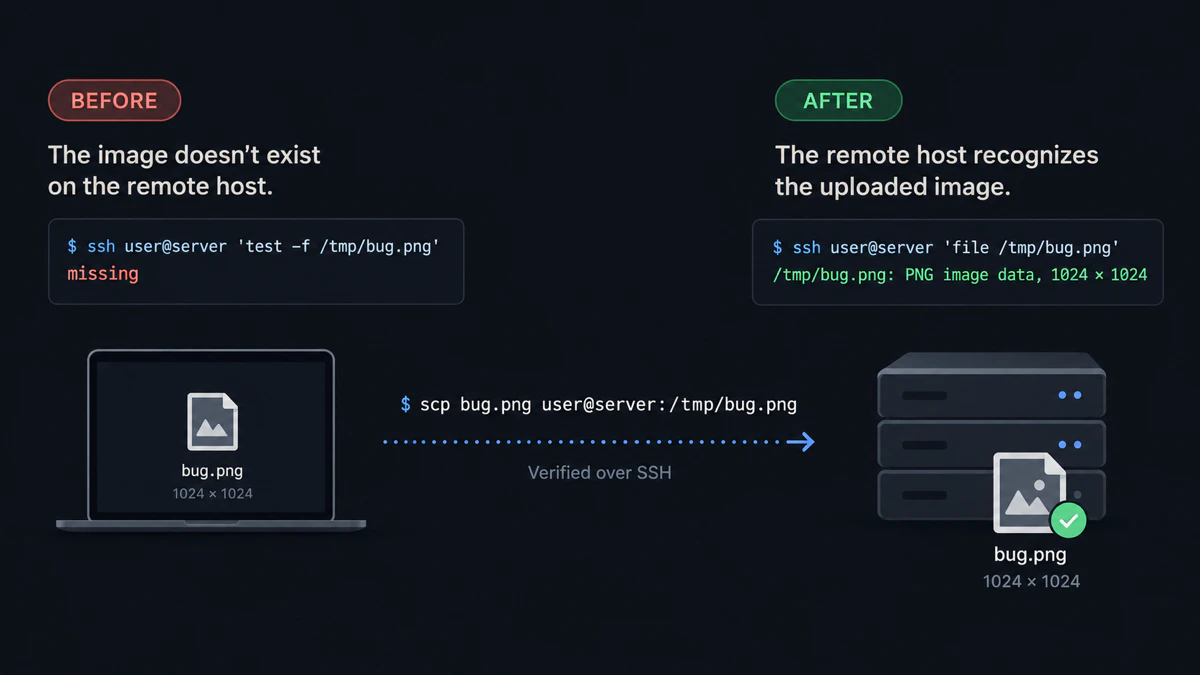
The tested recovery path is summarized here: missing remote file, scp, then a valid PNG on the host.
What the error means over SSH
Your terminal is on the laptop, but Claude Code is running on the server. A screenshot may exist in the laptop clipboard while the remote Linux session has no image-capable clipboard, no display server, or a terminal path that does not return the image bytes Claude Code expects.
Anthropic tracks both a Claude Code 2.1.181 image-paste regression over SSH and the broader headless Linux clipboard limitation. Those reports are stronger evidence than assuming every terminal behaves the same way.
Check whether the file is remote
hostname
pwd
test -f /tmp/bug.png && echo found || echo missing
Expected result: hostname identifies the server and the final line prints missing until you upload the image.
If the prompt contains /Users/you/… or C:\Users\you\…, it still contains a laptop path. The server cannot open it.
Fix the error with scp
Run the upload from the laptop. scp copies a local source to a remote target over SSH.
macOS or Linux
scp ~/Desktop/bug.png user@server:/tmp/bug.pngExpected result: the command exits without an error.
Windows through WSL
scp /mnt/c/Users/you/Pictures/bug.png user@server:/tmp/bug.pngMicrosoft documents that the Windows C: drive appears in WSL under /mnt/c.
Expected result: /tmp/bug.png exists on the remote Linux host.
Verify and give Claude the path
ssh user@server 'file /tmp/bug.png'Expected result: the server reports PNG or other supported image data.
Inspect /tmp/bug.png and explain the visible error.Expected result: Claude Code reads the remote file; it no longer needs the image clipboard for this request.
Send repeated screenshots without rebuilding the command
scp is still the clearest manual fix for one screenshot. For several saved images, copy multiple files with scp. For repeated screenshots or a mixed batch, install vmup and complete the first SSH upload, then collect clipboard images into one remote folder:
vmup --clipExpected result: vmup prints an Agent folder: path and copies a prompt that points Claude Code at that folder.
tmux and WSL checks
- tmux: first verify that ordinary text paste reaches the prompt. Regardless of the keybinding, a remote file path continues to work.
- WSL without a second SSH hop: Windows screenshots normally live under
/mnt/c/Users/…. Give Claude Code that WSL path after saving the image. - WSL followed by SSH:
/mnt/c/…belongs to the local WSL environment, not the second server. Runscpagain to place the image on that server. - Ctrl+V does nothing: the terminal may consume the key before Claude Code sees it. Type or paste the remote path as ordinary text.
For the complete upload workflow, read how to paste an image into Claude Code over SSH. For helper and shim trade-offs, see Claude Code SSH screenshot tools compared.
Last tested with
- Manual recovery: macOS 26.6, OpenSSH 10.3p1, localhost SSH target, September 16, 2026
- Linux recovery: Ubuntu 26.04, OpenSSH 10.2p1, Lima VM to localhost SSH target
- Batch workflow: vmup 0.4.0
- Claude Code evidence: issue reports for 2.1.181 and headless Linux behavior linked above
- WSL path form:
/mnt/c/...transfer executed under Ubuntu 26.04 and checked against Microsoft’s WSL documentation; native WSL was not available
Quick answers
What does “No image found in clipboard” mean in Claude Code over SSH? Claude Code did not receive usable image data from the clipboard available to the remote process. The screenshot may still exist only on the laptop.
Is this the same as Ctrl+V doing nothing? The underlying boundary may be the same, but the visible behavior depends on the terminal and Claude Code version. Some sessions print the error; others receive no image paste event.
Does this error also happen locally? Yes. A local clipboard can contain text, a file reference, or an image format Claude Code does not accept.
How do I fix it without a clipboard daemon?
Save the image, upload it with scp, and put the remote path in the prompt.
Disclosure: vmup is maintained by the author of this article. The manual scp recovery above is free and does not require vmup.